Instinctive

Instinctive music tools

See the harmony inside what you play.

Real-time chord and interval insight for musicians who want to understand the music beneath their fingers, rather than simply name it.

  • Real-time MIDI
  • Mac, iPad & iPhone
  • Private by design
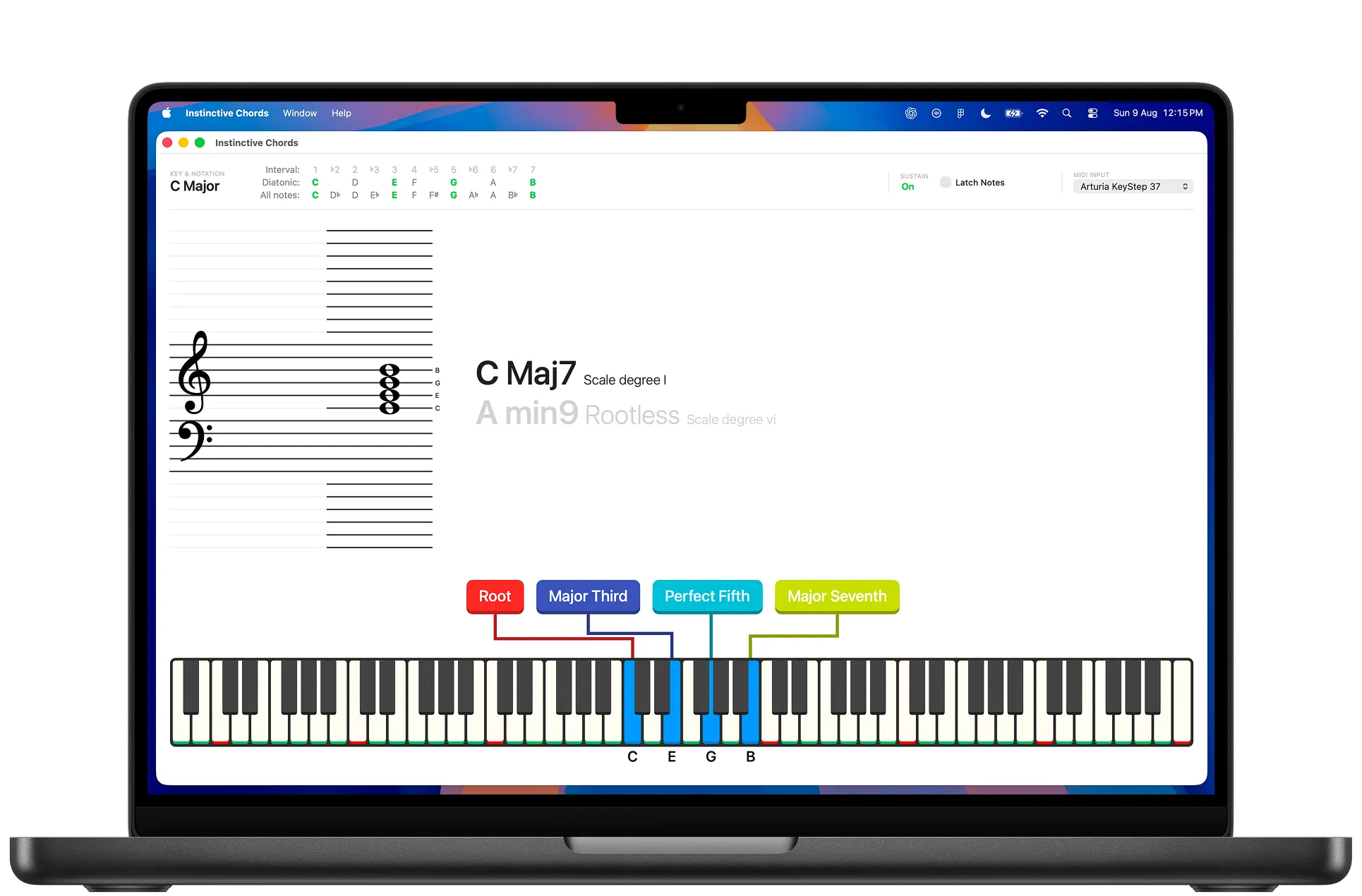
Instinctive Chords displaying a complex voicing, notation, intervals, and an on-screen keyboard on a MacBook

The idea

One musical question. Three ways to explore it.

Each app begins with the notes you play and makes their relationships visible. Choose the immediacy of iPad and iPhone, a focused Mac workspace, or a free first look with MIDI Mirror.

In plain language

Play some notes. See what chord you are playing.

If you play piano or keyboard and find a group of notes that sounds good, the app can tell you the name of the chord. The answer appears as you play, so you do not need to stop and search through a chord book or work it out first.

Find the name of a piano chord

Press notes on a MIDI keyboard, click the on-screen piano on Mac, or tap the keys on iPad and iPhone. Instinctive shows possible chord names in real time.

Learn chords while you practise

See the notes you are holding, the chord they make, and how they look on a piano and musical staff. This is useful when learning keyboard or checking what you played.

Go further when you are ready

Start with the chord name. When you want more detail, you can look at the notes inside it, different names for the same notes, inversions, and how the chord relates to a selected key.

Use it for lessons and creative work

The live display can help during piano lessons, practice, songwriting, rehearsals, music production, streaming, and tutorial videos.

The apps

Built around the way you work.

Three focused experiences, sharing the same goal: clearer harmony in the moment.

iPad & iPhone · iOS 15+

Intervals and Chords

Harmony that goes wherever your music does.

A direct, portable way to see the chords, notation, intervals, and key relationships you are playing. Set it beside your keyboard for practice, lessons, writing, or a quick theory check without leaving your instrument.
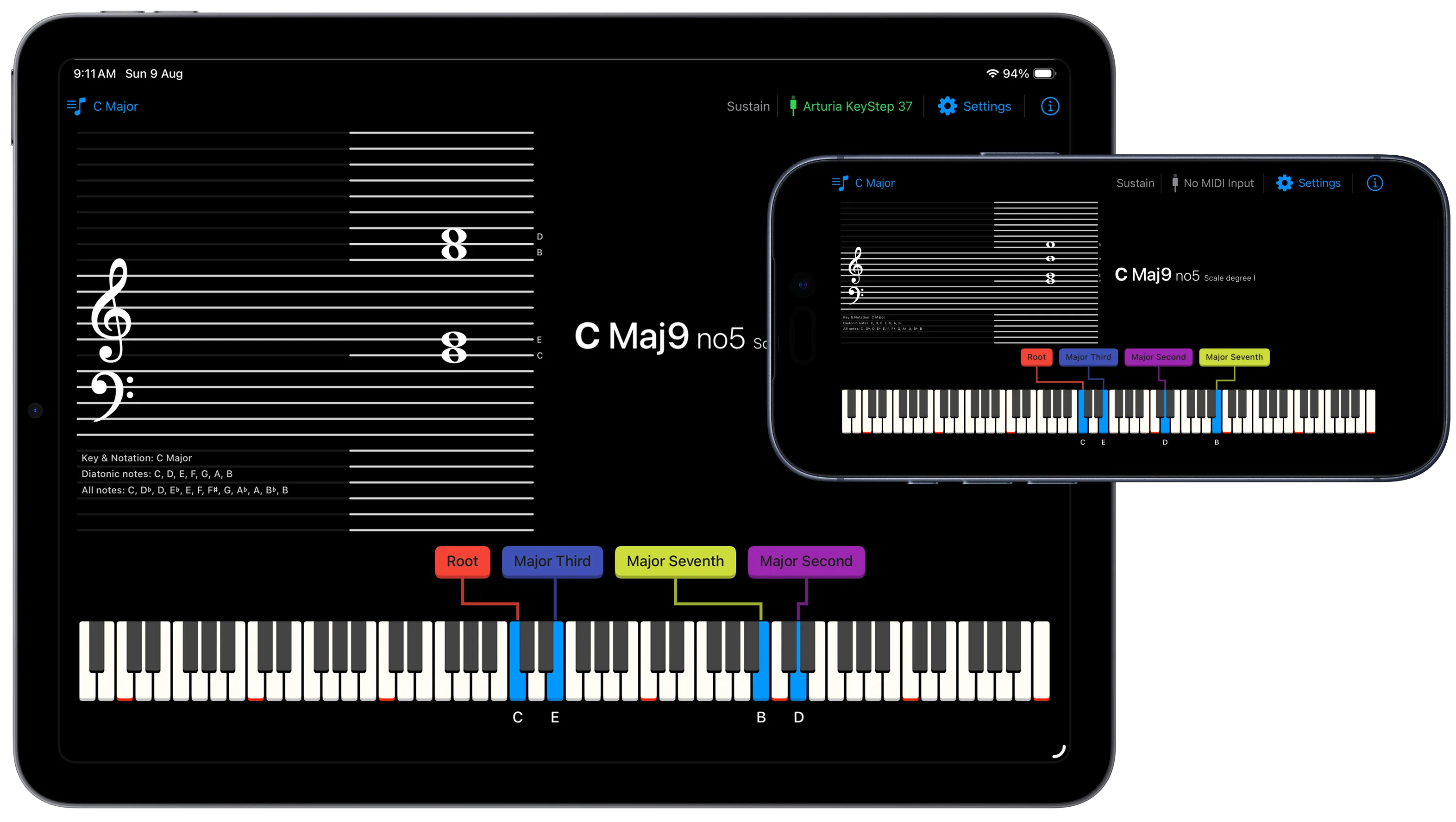
  • Immediate chord recognition from MIDI or the on-screen keyboard
  • Clear interval mapping from each note back to the chord
  • Key-aware notation, scale degrees, inversions, and rootless voicings
View on the App Store
Intervals and Chords displayed in full on both an iPad and an iPhone

Mac · macOS 11+

Instinctive Chords

A focused desktop workspace for going deeper.

Give harmony more room. Instinctive Chords brings notation, chord interpretations, interval relationships, and tonal context into a dedicated Mac workspace designed for longer practice, analysis, and writing sessions.
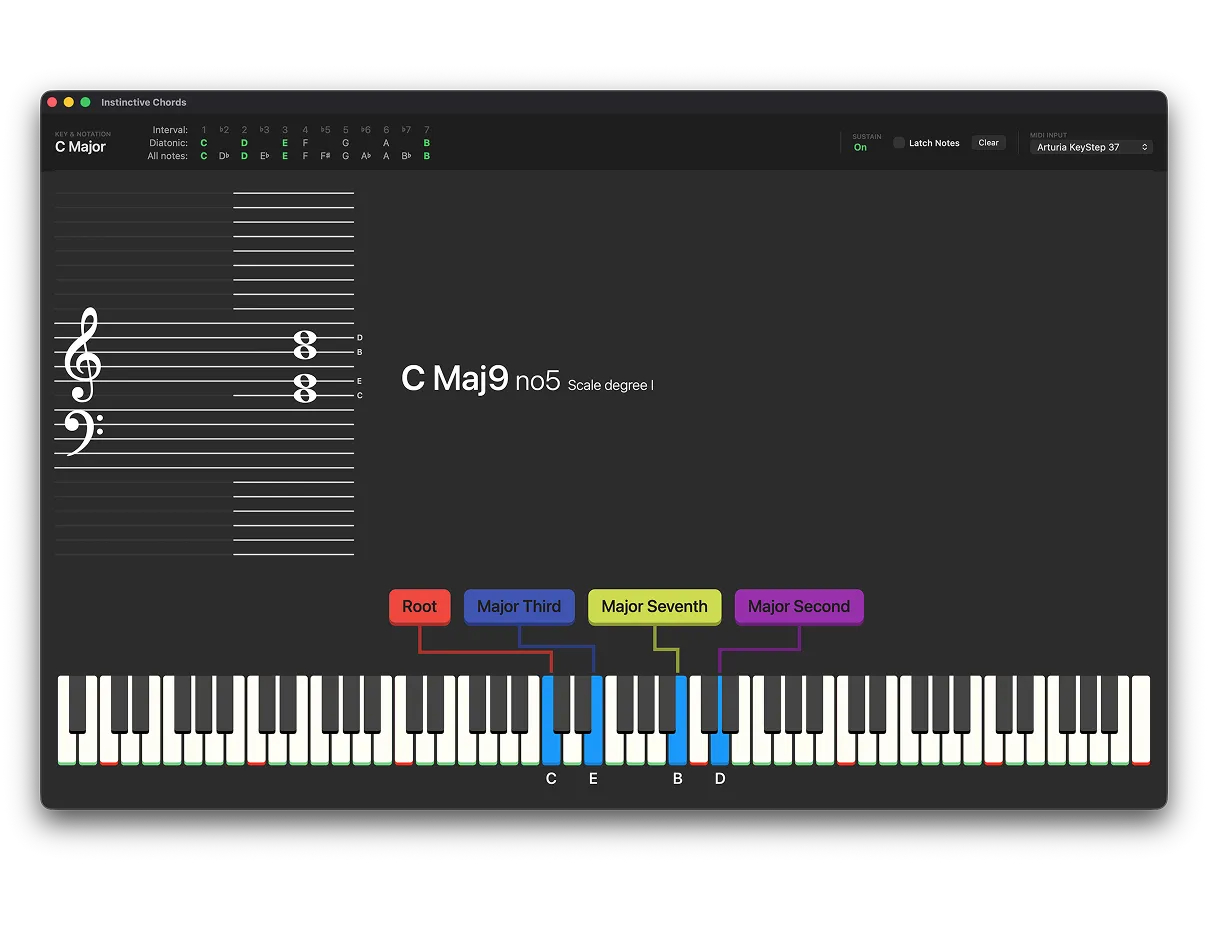
  • Connect a MIDI keyboard or play directly on screen
  • Explore alternate names, inversions, omitted tones, and rootless chords
  • Choose a major key or work key-free with preferred notation
View on the Mac App Store
Instinctive Chords for Mac showing musical notation, chord interpretations, interval labels, and the played notes

Mac · Free

MIDI Mirror

Start simple. See what your keyboard is saying.

MIDI Mirror turns your performance into a clean, customisable visual display. See notes and recognised chords as you play, open the Chord Guide for a useful explanation, and shape the display for practice, teaching, streaming, or video.

  • Free real-time note and chord display
  • Chord Guide with explanations and alternative interpretations
  • Extensive colour, keyboard, font, and layout controls

When you are ready for notation, interval maps, and deeper voicing analysis, the Instinctive Chords apps take the same idea further.

Download free for Mac
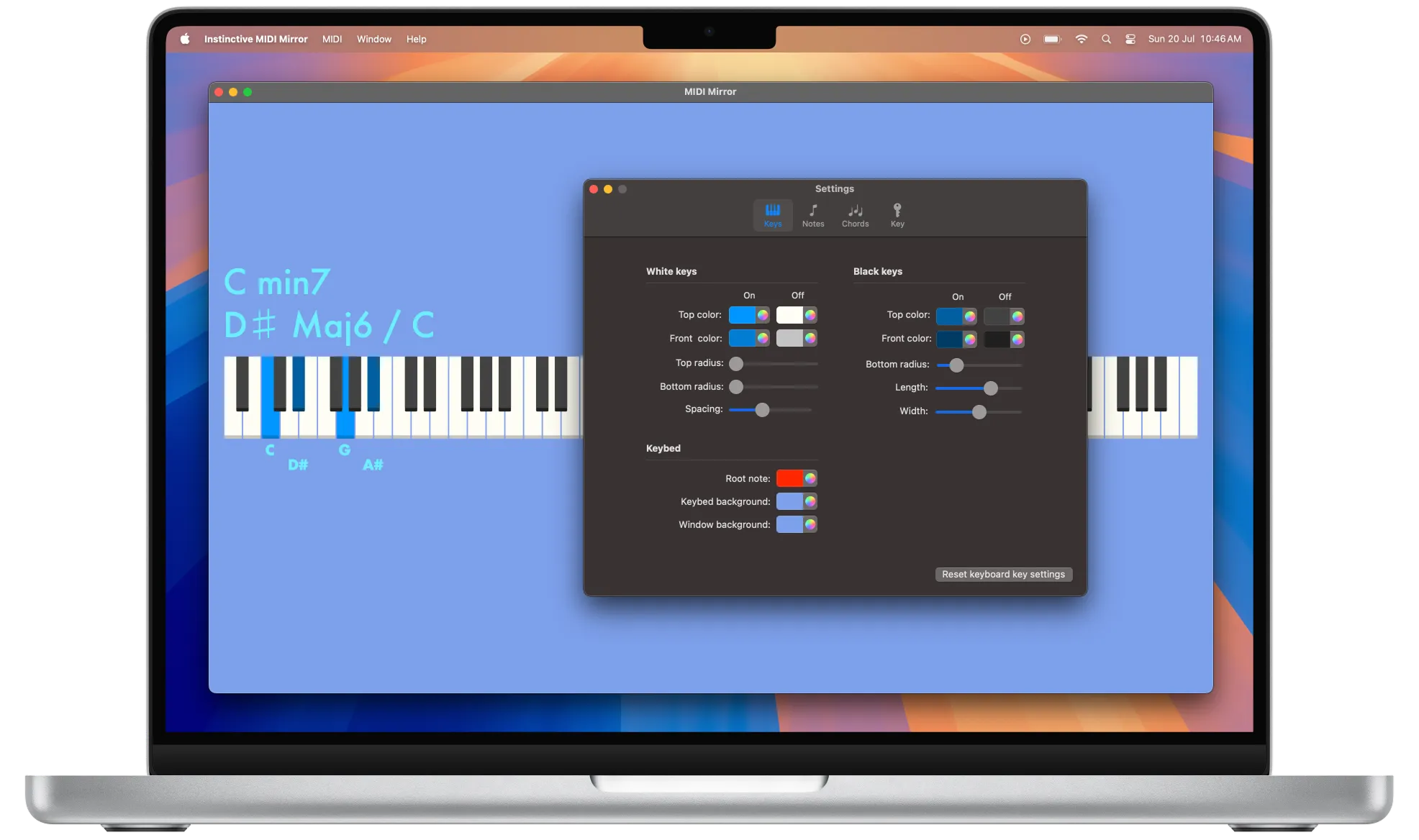
MIDI Mirror on Mac with a customised blue performance view and its visual settings panel

What becomes visible

Theory connected to the keys.

01

Chord recognition

See possible chord names update as the held notes change.

02

Interval structure

Understand the role each played note has inside the chord.

03

Tonal context

Choose a key to see scale degrees and what falls outside it.

04

Voicing awareness

Explore inversions, incomplete chords, and rootless possibilities.

Flexible note input

Play with the setup already in front of you.

Every app supports more than a connected MIDI keyboard. On Mac, notes can also be played from the on-screen keyboard with a mouse or trackpad. On iPad and iPhone, the interface is designed for direct touch. Each version uses the input methods that make sense for its device, so exploring a chord never depends on having external MIDI hardware connected.
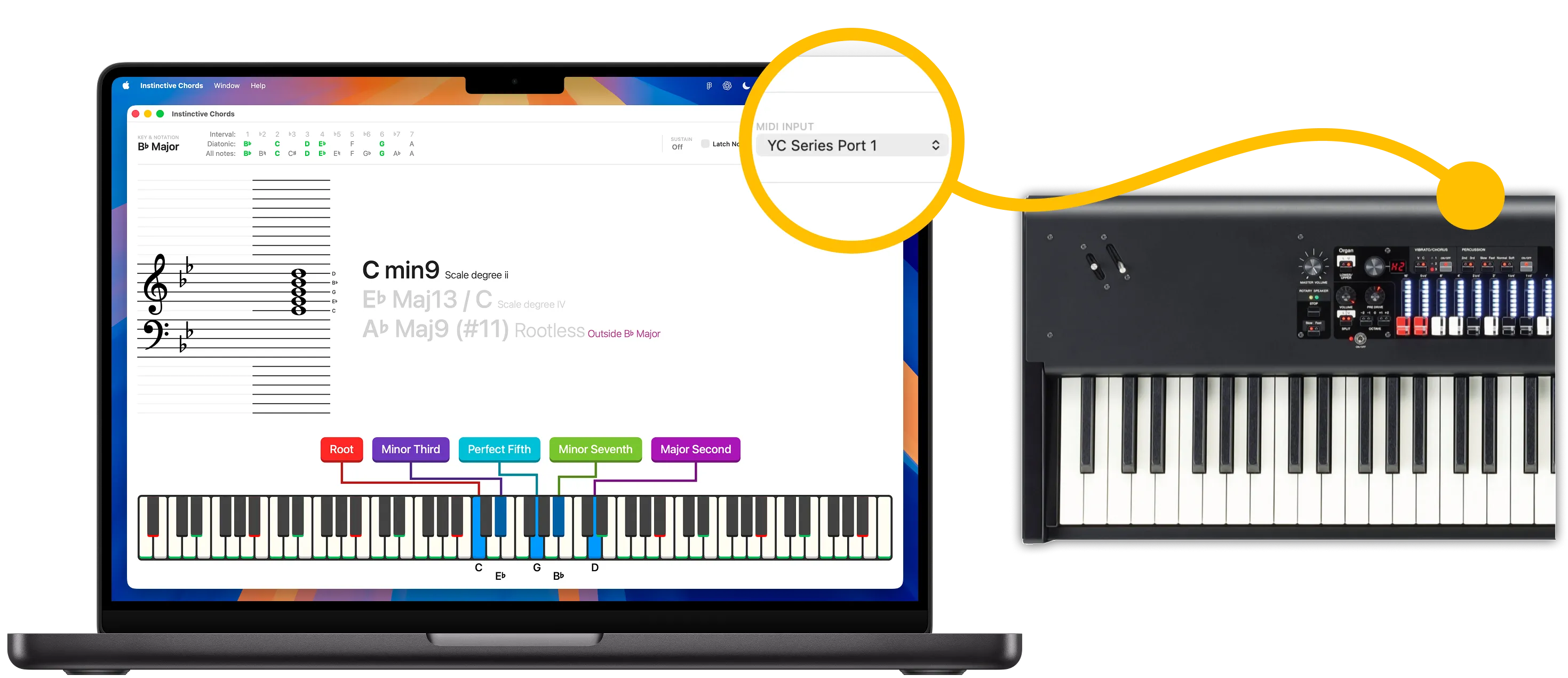
Instinctive Chords on a MacBook connected to a YC Series MIDI keyboard

Built to make theory visible.

Instinctive Chords began as a personal learning tool. It was a practical way to connect the chord name on screen with the interval structure underneath it.

The initial idea came from a gap between recognising a chord name and understanding its construction. Existing tools could identify notes played on a piano, but they did not make it easy to visualise how each interval contributed, how a voicing related to a scale, or why the same collection of notes could support different interpretations.

The first version was created to make those relationships tangible during practice. Seeing harmony mapped directly to the piano helped build a more practical understanding of music theory, transfer that knowledge to guitar, and make abstract ideas easier to apply. After proving useful as a learning tool, it was refined and developed into the apps available today.

See them in motion

From played note to visible harmony.

Intervals and Chords

See chord recognition, notation, intervals, and the on-screen keyboard working together.

MIDI Mirror

A flexible visual companion for your MIDI keyboard, lessons, and creative work.

Private by design

Your playing stays yours.

The apps process MIDI and musical input on your device. There are no accounts, advertising SDKs, or app analytics, and Instinctive does not receive your musical input.

Read the app privacy policy

About Instinctive

A small creative and consulting studio in New Zealand.

Instinctive is a New Zealand creative and consulting studio founded by Lynne and Karol. Together, they bring experience from organisations and working environments including Air New Zealand, Serato, ANZ, ASB, Trade Me, Foodstuffs, and Lighthouse.

Lynne's background spans project delivery, user experience, and UX leadership. Her core strength is helping teams understand people, shape more useful experiences, and lead design work with clarity. She has also supported a large-scale transformation as a change management consultant.

Karol began in software development and design before moving into business analysis and product ownership. His experience connects technical delivery, product thinking, and practical design. This helps turn complex requirements into products and services that can be understood, built, and improved.

Their combined work reaches across aviation, music software, banking and finance, e-commerce, fast-moving consumer goods, organisational transformation, and artificial intelligence initiatives. Instinctive remains intentionally small and hands-on, with its independent music applications reflecting the same curiosity and product craft.